New IglooHome Integration

Enable your renters to handle self pick-up and returns using smart padlocks and keyboxes from Igloohome!

With our Comydo integration, it has already been possible since 2025 to open electronic doors and compartments at the push of a button or via QR code scan, and in combination with Rentware to automatically generate time-restricted access permissions.
Requirements are a power supply, electronic locking systems, and mobile network coverage.

With Igloohome locks, neither a power connection nor mobile network coverage is required.
Igloohome locks are battery-powered and use internal software to calculate, based on a PIN code, the time period during which the PIN allows access.

With the Rentware–Igloohome integration, the process works as follows:

A customer books a rental via Rentware, for example from August 1st, 10:00 AM to August 3rd, 2:00 PM.
They receive a booking confirmation informing them that, for example, 2 hours before the rental starts, they will receive a separate email with a PIN code to open the lock, along with any additional instructions.

On August 1st at 8:00 AM, the customer automatically receives the email with the PIN code.
If they try to open the lock before 10:00 AM, the PIN will not work. During the entire rental period, they can open the lock as many times as they want using the PIN (and close it again without entering the PIN). After August 3rd, 2:01 PM, the PIN will no longer work.
(Note: You can add a buffer period of e.g. 1 hour before and after the rental period so the PIN remains valid slightly longer.)

If another customer has a rental starting at 3:00 PM on August 3rd with a different PIN, they can simply go to the lock and open it using their code.

Since the lock (without an Igloohome WiFi Bluetooth Bridge) does not have internet access, Rentware cannot receive events from the lock. This means Rentware cannot see whether or when the lock was used, nor can it display the battery status. It is also not possible to invalidate a PIN once it has been sent. These features are only available if the locks are connected to the internet using the optional Igloohome WiFi Bluetooth Bridge.

However, connecting the locks to the internet and enabling live data requires power, internet access, and a WiFi router. In such cases, our Comydo integration can also be an alternative.


Important notes (as of April 2026)

  • Customers currently cannot independently:
    • confirm pick-up or return
    • generate or sign a handover protocol
    • report damages or document them with photos
      (These actions can currently only be performed by the renter.)
  • These features will be available as self-service options for customers.
    Then customers will also be able to upload ID documents, other files, and damage photos to the booking record and handover protocol.
  • Self-service options for rescheduling or cancellations are expected no earlier than 2027. Until then, only the renter can perform these actions.

GPS tracking

If you want to track rented items via GPS, you must install a tracker in the hardware yourself and use the tracker’s software.
As of April 2026, there is no integration with Rentware for this, and it is generally not necessary since you can use the tracker’s own interface.

Note: Online booking with Rentware only works for station-based rentals. Free-floating models are not supported.


Recommendation

Equip your location with cameras and/or a geo-fence alarm to enable additional processes outside of Rentware.


How to set up Igloohome with Rentware

  1. Log into your Rentware account and activate the connection to your Igloohome account:
    https://app.rentware.io/settings/igloo
    Then complete the setup (assign locks to inventory, configure email settings)
  2. Purchase locks from Igloohome
  3. Download the Igloohome app and create an account (username & password)
  4. Scan the QR code on the lock to connect it with the app
  5. Add a credit card as a payment method here:
    https://connect.igloocompany.co/connect/login
    (Currently approx. $2/month fee)

New Mercado Pago Integration

New Mercado Pago Integration | Rentware – Rental Software

Your customers in Latin America can now pay you via Mercado Pago — and you receive the payments directly in your account.

We’re excited to announce that Rentware now integrates with Mercado Pago, the leading payment platform in Latin America. If you run a rental business with operations in the region — or if you have customers booking from Latin American countries — this one’s for you.

Mercado Pago is part of the Mercado Libre ecosystem, the largest e-commerce platform in Latin America. It’s how millions of people across the region pay for things online every day — in Argentina, Brazil, Chile, Colombia, Mexico, Peru, and Uruguay.

With this integration, your customers can select Mercado Pago at checkout when booking a rental through Rentware. They pay using whatever method works best for them — and you receive the funds directly in your Mercado Pago merchant account. Simple as that.


How does it work?

The process is fully integrated into the existing Rentware booking flow:

A customer visits your booking page, selects a rental, and proceeds to checkout. At the payment step, Mercado Pago is available as an option. They complete the payment, the booking is confirmed in Rentware automatically, and you receive the funds in your Mercado Pago account.

No changes needed to your stations, hardware, or any other part of your setup. This integration lives entirely on the checkout side.


Who is this for?

This is especially useful if you operate rentals in Latin America — shared mobility, e-bikes, scooters, outdoor equipment, or any type of rental where customers book online and pick up at a location.

But it’s not limited to operators based in the region. If your business is headquartered in Europe or the US and you have stations or booking activity in Latin America, you can enable Mercado Pago specifically for those markets.

Many consumers in Latin America prefer Mercado Pago over international card alternatives. Offering it at checkout means fewer drop-offs and a smoother experience for your customers.


How to get started

  1. Log into your Rentware account and go to Settings → Payment.
  2. You’ll see Mercado Pago as an option — add the required credentials and that’s it.
  3. Mercado Pago will be active as a payment option immediately.

Don’t have a Mercado Pago account yet? You can create one for free at mercadopago.com or through the country-specific version for your market.

(No setup or annual fees — only standard transaction costs apply.)


Good to know

The integration is currently available for operators with activity in:

Argentina Brazil Chile Colombia Mexico Peru Uruguay

You’ll need an active Mercado Pago merchant account in the relevant country to activate the integration. As with all our payment integrations, Rentware does not charge any additional fees on top of Mercado Pago’s own transaction costs.

Rental Business Models Overview

Rental Business Models Overview

Differences between short-term rental, long-term rental, subscription models, sharing models

We are often asked whether Rentware can be used for short-term rentals, long-term rentals, subscription models and sharing models. Additionally, the question arises whether a mix of these types of rentals can also be mapped within the same Rentware account.

The answer is: Yes, Rentware can be used for short-term rentals, long-term rentals, subscription models and to some extent also for sharing business models.

Originally, Rentware was developed for short-term rentals (rental durations from a few minutes up to several months), which is why we currently cannot map all other scenarios 100% perfectly. However, in 2026 we already have numerous customers who map all models with Rentware and also in combination.

To answer the question in detail and definitively for your specific case, it is first necessary to establish a common understanding of the individual scenarios and to draw distinctions.

In some cases, the boundaries are blurred and the models overlap.

Short-term rental:

  • Rental for a few minutes up to several months
  • Fixed rental duration, fixed defined start and end time
  • Only one invoice for the entire rental period
  • Payment of the total amount or deposit and final payment, but no recurring or monthly payments
  • Typically no exchange of the rental item within the rental period (exchange is the absolute exception)

Long-term rental

  • Rental for a few weeks up to several years
  • Fixed rental duration, fixed defined start and end time
  • For rentals from 2 months, monthly partial invoices
  • For rentals from 2 months also recurring or monthly payments, but possibly also payment of the total amount or deposit and final payment
  • Exchange of the rental item within the rental period occurs more frequently

Subscription models:

  • Subscription, i.e. “rental” for at least 1 month up to many years to the customer
  • No fixed rental duration, fixed defined start date. No defined end date, but minimum terms and cancellation periods
  • Monthly partial invoices
  • Recurring or monthly payments
  • Exchange of the rental item within the rental period or subscription duration occurs more frequently

Sharing models:

  • Often a mix of subscription model and short-term rental. There is a basic registration of the user (subscription model), but the rental item is then used by multiple renters and usage-based costs are incurred for the respective short-term rental
  • A special feature is that in sharing, the handover of the rental item often (but not always) takes place at different locations for each rental process, especially when it comes to free-floating concepts or C2C sharing
  • Subscription for at least 1 use or 1 month up to many years, but usually handover of different rental items at multiple points in time (short-term rentals)
  • Fixed rental durations, fixed defined start and end times of the respective short-term rentals
  • Monthly partial invoices, usage-based billing (multiple individual short-term rentals) possibly plus a monthly base fee
  • Recurring or monthly payments but with varying amounts due to the usage component
  • Exchange of the rental item within the rental period or subscription duration occurs regularly, as each use is an independent “rental process”

How well can Rentware map the different models and what should be considered?

Short-term rental:

Short-term rentals are the absolute strength of Rentware.

Short-term rentals can also be mapped in combination with long-term rentals and subscription models.

However, there are individual cases that we cannot map perfectly or at all:

What we currently (as of 2026) cannot map are rental processes or bookings with different rental periods at item level. The rental period is defined at the booking level. This means that all rental items can only be handed over and returned at the same time. Rentals with different rental periods must currently still be mapped in separate bookings.

If your business model is exclusively B2B, we can probably map this well, but you should definitely coordinate with our team, as you likely have very individual requirements.

Free-floating models cannot be mapped.

Long-term rental:

Long-term rentals can be mapped well in Rentware and also in combination with short-term rentals. One-time online payments based on the total period or total amount as well as automatic monthly partial payments of the monthly rents are possible.

Both deposits and any number of remaining payments can be configured and collected online. Monthly automatic online payments are possible via credit cards or SEPA direct debit. When combined with short-term rentals, thresholds (rental duration or payment amount) can be defined from which monthly payments are allowed instead of or optionally in addition to one-time payments. Both changing the credit card during the rental period and switching between payment methods are possible. In addition, automatic payment reminders are sent if automatic rent collection is not possible (e.g. credit card or account expired / not covered).

Automatic monthly partial invoices will be available from around mid-2026. Until then, monthly partial invoices must be created and sent via a workaround.

An exchange of the rental item within the rental period can currently (as of March 2026) only be mapped via a separate rental process.

Subscription models:

As of 2026, real subscription models, i.e. indefinite long-term rentals with cancellation periods and automatic renewals, can only be mapped to a limited extent. The limitation is that there must technically be an end date and cancellations or extensions must be controlled manually. Monthly online payments can be mapped. Otherwise, everything that applies to long-term rentals also applies to subscription models.

For the end of 2026, it is planned to be able to fully map subscription models.

Sharing models:

Whether a specific sharing model can be mapped with Rentware should be discussed with the Rentware sales team.
Nicht abbildbar sind Free-Floating Modelle.

8 Years of Rentware

Happy Birthday, Rentware!

For eight years now, we have been working hard every day to build the best software solution for online rentals and online bookings in general.

Apparently, we are doing this quite successfully, because over 600 satisfied companies in 20 countries as customers and a genuine 4.9 Google star rating speak for themselves.

Our strongest customer segments are:

  • Vehicle rental
  • Boat rental
  • Machine, trailer, and equipment rental
  • Event technology rental
  • Bicycle and e-bike rental
  • Online booking of events
  • Everything from parking spaces to waterfront properties, toys, and advertising space to mobile chicken coops with real chickens.

So far, our software enables our customers to become bookable online and to manage bookings and handovers completely online and on the go, assign locking authorizations, and open doors, thereby digitizing their entire business.

By the 2026 season, we will enable the process of documenting the handover of rental items and damage to be carried out completely without staff (i.e., self-service).

Many thanks to the entire team and all our customers!

Happy Birthday, Rentware!

Ready for e-invoicing with Rentware

With Rentware, you as a landlord will be ready for e-invoicing in time (in 2025)!
But stay relaxed!

From 2025, the obligation for e-invoices will initially only affect the receipt of invoices, i.e. your invoice receipt in the accounting department.

From 1 January 2027 at the earliest, you will also have to send invoices to your customers as e-invoices (i.e. in outgoing invoices).

However, this only applies to invoices to companies, i.e. in B2B business, as private customers do not require invoices and are not entitled to them. A booking confirmation and a payment confirmation are sufficient for private customers.

Until the end of 2026, you can continue to send invoices to other companies in B2B business as a PDF or by letter and if your annual turnover is less than €800,000, you can even do so until the end of 2027. This will also be possible for private customers after 2027 and always (because private individuals do not use any software to display/read invoices in the new electronic format at all).

Nevertheless, we will offer the e-invoice option in 2025 so that they can use this procedure as an option.

From 2025, you as an entrepreneur must initially only be able to read incoming invoices in electronic format in the accounting department.

7 Years of Rentware

How time flies! It has now been 7 years since the three of us started in our first office in Kreuzberg with our mission to develop and distribute a cloud-based SaaS solution for the online bookability and digitalisation of companies with the business models of rental or leisure activities. Today, 7 years and 2 relocations within Berlin later, 15 people are working on further developing, supporting and popularising the product.

Rentware is currently in use in 15 countries. Our strongest customer segments are vehicle rentals, machine and equipment rentals, boat rentals and event equipment rentals. We also cover a number of other sectors and business models with our online booking system. These range from leisure activities to the rental of holiday flats and event spaces to chicken-rentals.

Our customers can book online and all processes are digital, mobile, highly automated and paperless. Cash is no longer necessary as a payment method, but is still possible.

In the coming months, we will focus on shifting further processes and work steps from the lessor to self-service by the renter.

Happy Birthday Rentware!

Over 400 customers in 15 countries: Rentware continues to grow

We are digitizing more and more rental companies in a wide range of sectors and countries.

Rentware not only makes companies bookable online via their own website and partner websites, but also digitally maps the entire rental process. Customer communication by telephone and e-mail is now only necessary in a few cases. This saves time and money and also makes the whole process more relaxed for tenants.

For around 20% of our new customers, we also create the websites and thus offer a complete solution for the online presence from a single source.

Here are two interviews (in German) that illustrate the effect the use of Rentware has on the business:
Interview with Richard from Flotte Dahme boat rental
Interview with Chris from Escape Academy

5 years of Rentware

It’s our birthday!

5 years ago today we started to develop the best rental software.
We think the result is something to be proud of! Many thanks to all employees, freelancers and customers who have accompanied and supported us on what has now been quite a long journey. Every day it is a great pleasure to work with the customers on the software and with the team!

5 years means about 3,000 deploys of new features and updates. Rentware was offline for only 3 hours during the 5 years. So when there were problems, it was only for a few minutes at a time. Obviously we have done some things right with the infrastructure.

Here’s to the next 5 years!

We continue to build the perfect software for rentals and appointment bookings.

Cart and shop integration

How to turn your website into an online shop

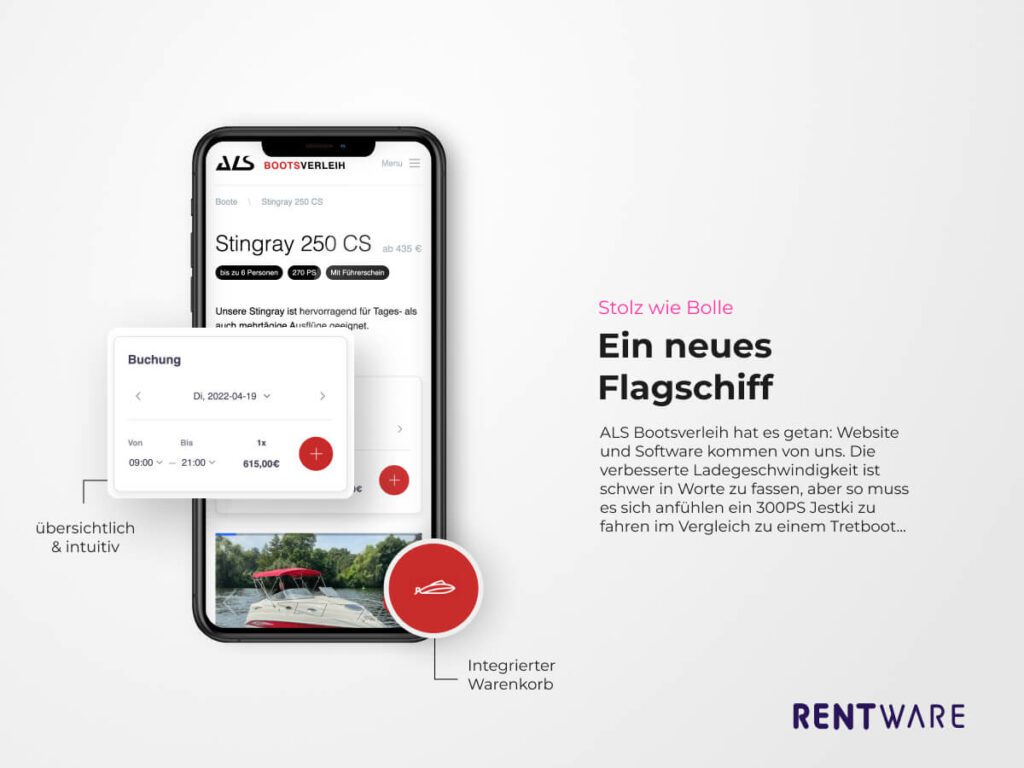
With just a few lines of code, the rental shop is added to your website quickly and without much effort. Highly modern, the available items can be selected via an integrated widget. The shopping cart on your website is as simple as a plug-in, yet has the full functionality of an entire online shop. At the touch of a button, three lines of code are generated, which you can then copy and paste onto your website. This is how our rental software turns your website into an online rental shop.

rentware customer als neu
als-bootsverleih.de

A clickable icon in the corner

The shopping basket is displayed as a small button on your website. This way, your customers can see all the items they have selected. Clicking on the shopping basket icon opens a pop-up and the selection can be changed again.

Decide which view your customers use to enter the shop!

We have various views to choose from

Selection via the booking calendar

If you rent out your inventory on a daily or hourly basis, a date can be clicked on in the calendar. Then the desired time of the rental is set. Clickable here are only the dates and times when the item is still available!

No matter what your rental model is: Our rental software lets you set the rental times and slots freely.

If you rent out your articles and products for several days, the first view of the widget is different. In a calendar, the free days are marked in colour, a desired period can be selected. Additionally, a pick-up and a return time can be clicked.

The clock time entry is optional. If you only rent by the day or have fixed pick-up and drop-off times on certain days, you can set that too with our software for your rental.

rentware solutions booking cart checkout

Checkout and payment process

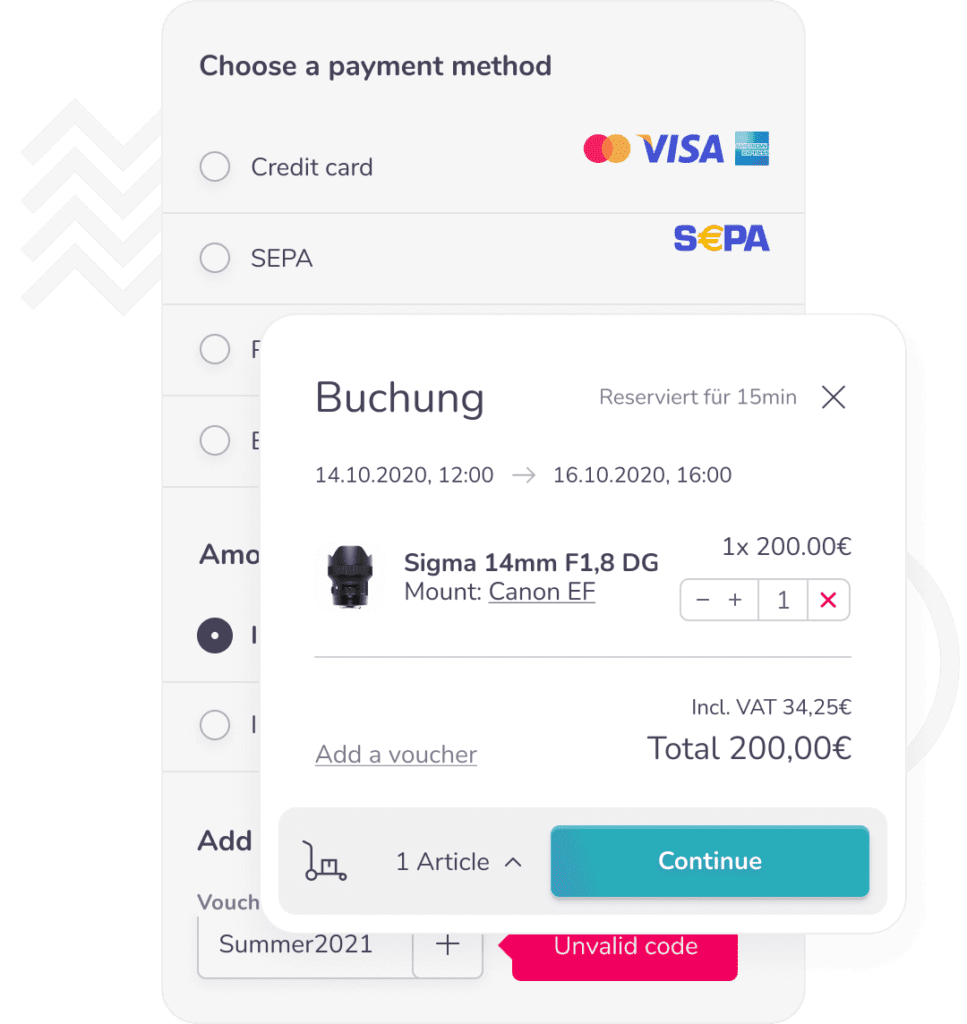
Each booking step is displayed in the shopping cart widget. After your customers have decided on a product and a period, they are guided through the payment process. Beforehand, personal data must be entered into a form: Of course, our software checks the completeness of the data.

After that, the customers choose the desired payment method. No matter whether they want to pay by credit card, PayPal or Sofortüberweisung – nothing now stands in the way of booking.

After booking, the current order can be displayed in a booking overview. Remaining amounts can be paid via Rentware online or with an interface to your cash register system on site.

Which widget would you choose?  

Arrange a free live demo now and see how online rental works with state-of-the-art technology. What is special about your rental business that you want to map with Rentware? Talk to us – together we will find a solution.

Over 200 customers in 11 countries place their trust in Rentware.

We are delighted with the trust our clients have placed in us and the strong growth we have experienced over the last 12 months. Many exciting rental companies have been added in a wide range of industries. We feel that the trend of renting and leasing continues to strengthen and the pressure of digitalisation is increasing.

Rentware has strengthened its position as the best booking system for boat rentals, is established as the most innovative software for renting vehicles, machines, equipment and is successfully used in many other rental industries. Rentware is the only rental software that is easily configurable even for complicated rental models. We have big plans for the next years and have the perfect team for it.