

Quick start › Inventory
# Add security deposits (2 min)
How to easily add deposits (3 min).
If you are renting out highly valuable products it's advisable to add a **security deposit** for every booking happening. You have to use our deposite item type. The deposit item type has 0% tax rate by default and shows the deposit outside of the tax relevant cart and invoice total amount, because it is no tax and invoice relevant thing.
### Setup
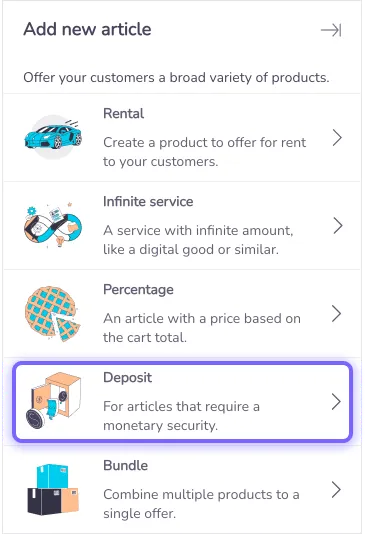
1 )To add a deposit automatically to each booking create a new one first via the creation menu:
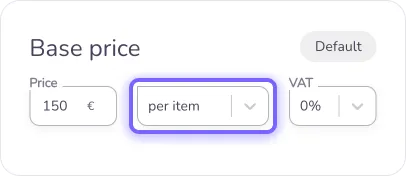
2) Then describe the deposit like any other and set the price to **per item** to only add it once and not based on time. Tax rate has to be 0%.
3) Lastly navigate to the availability settings of your deposit article and add the products you wish to add the deposit automatically to, once a rental is added to cart.
Once you created a deposit, it can be used for all products by adding individual articles or groups to the list.
Add security deposits (2 min)
How to easily add deposits (3 min).

If you are renting out highly valuable products it’s advisable to add a security deposit for every booking happening. You have to use our deposite item type. The deposit item type has 0% tax rate by default and shows the deposit outside of the tax relevant cart and invoice total amount, because it is no tax and invoice relevant thing.
Setup
1 )To add a deposit automatically to each booking create a new one first via the creation menu:

- Then describe the deposit like any other and set the price to per item to only add it once and not based on time. Tax rate has to be 0%.

- Lastly navigate to the availability settings of your deposit article and add the products you wish to add the deposit automatically to, once a rental is added to cart.
Once you created a deposit, it can be used for all products by adding individual articles or groups to the list.